Hear the Question
Capture meeting or system audio on macOS and keep the question visible while it is being asked.
Read a live transcript and get a structured answer path for behavioral, technical, and coding interviews—without losing focus on your call.
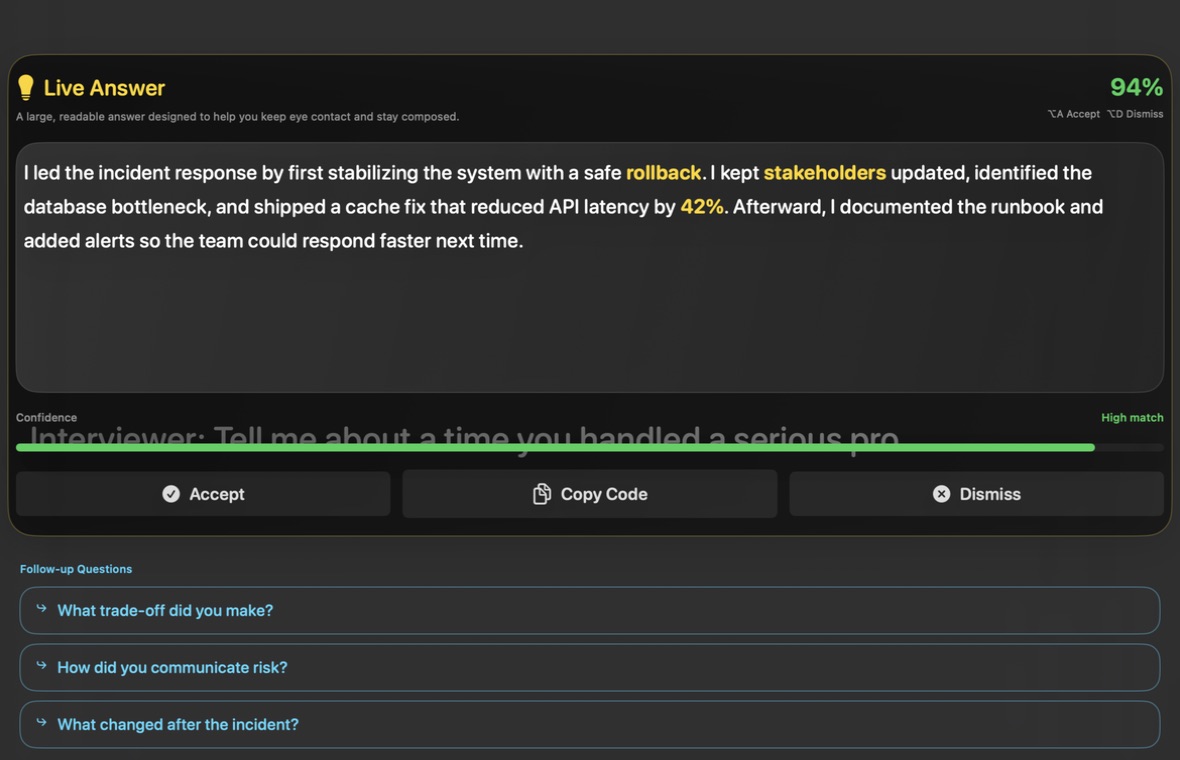
AI Job Interview is built for real interview pressure. It helps candidates hear the question clearly, see a usable answer faster, stay ready for follow-ups, and work through screenshot-based technical prompts without losing context in extra tabs.
Capture meeting or system audio on macOS and keep the question visible while it is being asked.
Get structured answer points for behavioral stories, technical explanations, and high-pressure live interview moments.
Keep momentum when the interviewer digs deeper and connect the next answer back to the original question.
Turn written coding prompts and on-screen problem statements into a clearer approach, edge cases, and explanation path.
Interview questions often include details that change the right answer: constraints, examples, deadlines, scale, or team context. AI Job Interview keeps the question visible as a transcript so you do not have to rely on memory when the pressure spikes.
The transcript helps you confirm exactly what was asked before you answer. This is useful for behavioral questions with multiple parts and technical questions where one constraint changes the solution.
When the interviewer adds a follow-up, the app keeps the original question nearby. That makes it easier to connect your next answer to the previous context.
The app is built for a Mac desktop workflow with menu bar access, overlay tuning, hotkeys, and settings for display, provider, credits, and support.
Strong interview answers feel calm and organized. AI Job Interview turns a raw question into answer points you can speak through: STAR structure for behavioral rounds, direct explanations for technical concepts, tradeoffs for system design, and approach notes for coding prompts.
Use situation, task, action, result, and reflection to keep stories complete. The app can help you include impact, ownership, and what changed afterward.
Structure answers around definitions, tradeoffs, complexity, edge cases, and examples so the interviewer can follow your reasoning.
When the interviewer digs deeper, use the existing transcript and answer outline to move into the next level of detail without losing momentum.
Technical prompts are not always spoken. Some appear in a shared editor, assessment page, slide, document, or browser window. Screenshot solve captures that written context and turns it into an approach, edge-case checklist, complexity notes, and explanation plan.
Capture the written problem statement when the transcript alone is not enough. This helps preserve constraints, examples, input format, and expected output.
Use the generated structure to explain how you would solve the problem, why the approach works, and which tradeoffs matter.
Good coding interview answers include tests and edge cases. Screenshot solve helps surface those details before you start speaking too broadly.
Start with Hosted Gemini using sign-in and credits, or switch to BYOK and Custom AI when you prefer to use your own OpenAI-compatible endpoint.
Hosted Gemini keeps setup fast. BYOK gives power users a free lane for their own model usage because those requests do not consume Hosted Gemini credits.
Usage math: a live answer or follow-up costs 1 Hosted credit; screenshot solve costs 3. BYOK and Custom AI use your own provider and consume 0 Hosted credits.
Prices shown in USD from the current US App Store listing. Apple may display local currency and tax. Credit packs are one-time purchases; subscriptions renew unless cancelled in your App Store account.
Audio is used for transcription. Screenshot text is recognized on-device, then the resulting prompt text is sent only when you request an AI answer. Hosted requests pass through the app backend to Gemini; BYOK requests go to the provider you configure.
The app backend stores account, subscription, credit, and aggregate usage records. It does not write interview prompt text or generated answers to its database. AI providers process request content under their own terms. You can delete hosted account data from the app.
Read the full privacy policy for permissions, temporary screenshots, providers, account deletion, and this website's local-only CTA measurement.
A live interview has a different rhythm than normal research. You need a compact workspace, the question in front of you, and an answer outline that matches the interview format. AI Job Interview focuses on the Mac interview workflow instead of asking you to copy prompts into another tab.
Designed around menu bar access, overlay placement, display tuning, live transcript, screenshot prompts, and a dedicated AI settings flow.
Useful for research, but less focused during live calls because you must copy context, switch windows, and reshape generic answers yourself.
Powerful for general questions, but they usually do not understand your interview state, credit model, provider lane, or screenshot workflow.
Explore focused guides for the most common search intents around AI interview copilot workflows, technical interview support, coding prompts, behavioral answers, Mac setup, and BYOK provider control.
Learn how live transcript, structured answers, follow-ups, and screenshot prompts work together.
Understand the native Mac workflow for live interview support and technical prompts.
Use answer structure for concepts, system design, coding rounds, and technical follow-ups.
Prepare approach outlines, edge cases, complexity notes, and explanation points.
Use STAR-style structure to answer leadership, conflict, failure, and impact questions.
Capture written technical prompts and turn them into structured answer guidance.
A practical guide for using AI as structure during technical interview calls.
Build clearer behavioral answers with situation, task, action, result, and reflection.
Configure permissions, provider, credits, overlay, and support before the interview.
Choose between Hosted Gemini credits and your own OpenAI-compatible provider.
Quick answers for the most common setup, privacy, and billing questions.
No. It supports behavioral interviews, technical interviews, coding interviews, system design interviews, and AI interview prep.
When you capture a prompt, the app can use Hosted Gemini or your custom AI provider to explain an approach, edge cases, and solution structure.
No. BYOK and Custom AI requests do not consume Hosted Gemini credits because you are using your own provider.
Open the support page or email Hotuananh90@gmail.com with your app version, macOS version, and the exact error message.
Use AI Job Interview as your Mac interview app for live transcript, AI interview copilot answers, technical interview assistant workflows, and screenshot-based coding help.